vs控制台程序隐藏窗体 - Wed, Apr 1, 2020
vs控制台程序隐藏窗体
vs控制台程序隐藏窗体
方法一:修改链接器设置(推荐)
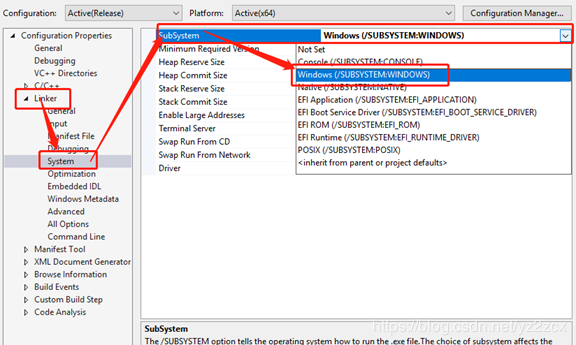
步骤1:修改子系统
“配置属性”->“链接器”->“系统”->“子系统”,设置为“Windows(/SUBSYSTEM:WINDOWS)”,原来可能是默认为“控制台(/SUBSYSTEM:CONSOLE)”的。
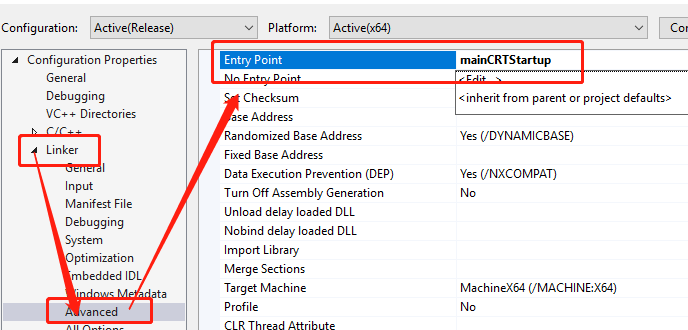
步骤2:设置入口点
“配置属性”->“链接器”->“高级”选项中添加“入口点”:mainCRTStartup:
方法二:使用代码隐藏窗口
使用WinMain
#include <windows.h>

int WINAPI WinMain(HINSTANCE hInstance, HINSTANCE hPrevInstance, LPSTR lpCmdLine, int nCmdShow) {
    // 你的代码
    return 0;
}
使用FreeConsole
#include <windows.h>

int main() {
    // 隐藏控制台窗口
    FreeConsole();

    // 你的代码
    return 0;
}
使用ShowWindow
#include <windows.h>

int main() {
    // 获取控制台窗口句柄并隐藏
    HWND hwnd = GetConsoleWindow();
    ShowWindow(hwnd, SW_HIDE);

    // 你的代码
    return 0;
}
方法三:使用#pragma
#pragma comment(linker, "/subsystem:windows /entry:mainCRTStartup")

int main() {
    // 你的代码
    return 0;
}
方法四:创建Windows应用程序项目
新建项目时选择“Windows桌面应用程序”而不是“控制台应用程序”。
常见问题
Q: 程序闪退?
确保程序末尾有暂停或等待:
#include <windows.h>

int WINAPI WinMain(HINSTANCE hInstance, HINSTANCE hPrevInstance, LPSTR lpCmdLine, int nCmdShow) {
    // 你的代码

    // 如果需要暂停
    MessageBox(NULL, "程序执行完成", "提示", MB_OK);

    return 0;
}
Q: 如何输出调试信息?
使用OutputDebugString:
#include <windows.h>

int main() {
    FreeConsole();

    // 使用调试输出
    OutputDebugString("Debug message\n");

    return 0;
}
Q: 如何重定向输出到文件?
#include <stdio.h>
#include <windows.h>

int main() {
    FreeConsole();

    // 重定向输出到文件
    freopen("output.txt", "w", stdout);
    printf("This goes to file\n");

    return 0;
}
完整示例
#include <windows.h>
#include <stdio.h>

// 使用WinMain作为入口点
int WINAPI WinMain(HINSTANCE hInstance, HINSTANCE hPrevInstance, LPSTR lpCmdLine, int nCmdShow) {
    // 隐藏窗口(可选,WinMain默认不显示控制台)
    HWND hwnd = GetConsoleWindow();
    if (hwnd) ShowWindow(hwnd, SW_HIDE);

    // 程序逻辑
    MessageBox(NULL, "程序正在运行", "信息", MB_OK);

    return 0;
}
最佳实践
- 开发阶段:保留控制台便于调试
- 发布阶段:隐藏控制台窗口
- 日志记录:使用文件日志代替控制台输出
- 调试输出:使用OutputDebugString和DebugView工具